
A menu bar app for Mac

Layouto types the long parts for you and quietly fixes the typos.

Your shortcuts grow into full phrases, misspelled words correct themselves, and a word typed in the wrong keyboard layout comes out right. It runs inside Apple’s App Sandbox, it has passed Apple’s strict review for the Mac App Store, and everything you type stays on your Mac.

Download Layouto on the Mac App Store
Free for 7 days, then a monthly or yearly subscription.
macOS 13 or later.

An example: with the Greek keyboard layout on, someone types “Good morning” and the first word appears as Greek letters. After the space, Layouto switches to English and the word becomes “Good”. On the next line the shortcut “;promo” expands into “Congratulations on the new role!”, and “!sig” into the sign-off “Best, Tonny”.

Sandboxed and reviewed by Apple

It runs in the App Sandbox, and everything you type stays on your Mac.

Stays out of Terminal

Turn it off for Terminal, code editors or any other app.

Many scripts

It works with Latin, Cyrillic, Greek, Hebrew and Arabic layouts.

What Layouto does while you type

Three things happen as you write, and a few quieter features keep them out of your way.

Text replacements (shortcuts)

Type a short trigger, and the full phrase appears the instant you press Space. Set up your own: an email sign-off, a home address for delivery apps, a boilerplate reply you type ten times a day.

More

Each shortcut is yours to define, and there’s no preset list you’re stuck with. This runs independently of layout conversion, so it works the same whether you’re typing in English, Greek, or anything else Layouto supports.

Most people end up with a handful of shortcuts for the things they type constantly, and forget they’re even there.

For example

You end dozens of emails a day with the same sign-off. Set up brgds once, and from then on your whole sign-off appears the moment you press Space: your name, your title and a link to your calendar.
Word autocorrect

Layouto checks each word you type against your Mac’s built-in spell checker, the same one Pages and Mail use, and fixes real mistakes on the fly, before you’ve moved to the next word.

More

Layouto never flags a real word, and it only steps in when the dictionary is confident something’s wrong, not when a word simply looks unusual. Turn it off entirely in Settings if you’d rather catch and fix mistakes yourself.

For example

You have typed “definately” for as long as you can remember, and the red underline stopped teaching you anything years ago. Layouto turns it into “definitely” the moment you press space, and the sentence carries on.

Automatic layout conversion

If you forget to switch your keyboard layout, Layouto notices and converts the text into what you meant to type, with no extra effort on your part.

More

It works automatically between Cyrillic, Greek, Arabic and Latin layouts, in any combination you use every day. For Hebrew and other languages that macOS has no full dictionary for, press Shift twice to convert.

Someone in Berlin who forgot to switch back from Greek loses nothing: the correction happens in place, before the sentence is even finished, with no manual layout switching required.

For example

You answer an Athens client in Greek, then turn to an English email without switching the layout. The first word starts coming out in Greek letters, and by the time you press Space it already reads “Thanks”.

Per-app exceptions

Terminal and code editors are exactly where a keyboard correction tool shouldn’t be guessing. Add Terminal.app, VS Code, or any app to Layouto’s exception list, and it stops watching entirely inside them: no layout switching, no autocorrect.

More

Your commands and code stay exactly as typed, typos included, because in a shell a ‘corrected’ character can mean a different command. The exception list lives in Settings and takes effect immediately, without a restart.

It’s a blunt tool on purpose: inside an excluded app, Layouto simply isn’t there.

For example

You deploy to production from Terminal. With Terminal on the exception list, Layouto stays out of it entirely, and every command runs exactly as you typed it.

Case-sensitive protected terms

Brand names have one correct capitalization, and autocorrect tools routinely get it wrong. Layouto keeps a list of protected terms, including iPhone, iCloud and macOS, and never touches their casing, even when they would otherwise trigger a correction.

More

You can add your own terms too: a company name, a product, anything you type often that a spell checker might flag as a typo. Once it’s on the list, Layouto treats it as correct no matter what layout or language context it appears in.

For example

You write about Apple products all day. iPhone, iCloud and macOS stay exactly the way you typed them, and so does the name of your own company once you add it to the list.

Autocorrect in more than 20 languages

Word autocorrect runs on top of layout conversion and uses your Mac’s built-in spell checker for each language, so it stays current with system updates.

More

Out of the box it covers Arabic, Russian, Ukrainian, Bulgarian, Turkish, German, Spanish, French, Portuguese, Italian, Polish, Swedish, Danish, Norwegian, Greek and more. That’s over 20 languages in total.

If your language isn’t in that list, install any Hunspell dictionary (the same .dic/.aff format LibreOffice and Firefox use) into the Library folder in your home folder, and Layouto detects it at launch and converts layouts for that language automatically. Autocorrect for it also needs a word list Layouto doesn’t have yet.

For example

Half your family writes in Greek, the other half in English, and your in-laws have just started writing in Bulgarian. Layouto keeps up with all three layouts without being told which one you meant.

Assistive technology

Layouto asks for the macOS Accessibility permission and uses it for exactly one purpose: helping you enter text. Someone with ADHD or an executive function disorder should not have to keep track of which layout is active at every moment.

More

Blind and low-vision people type by touch and hear their text through VoiceOver: checking which layout is on takes an extra step, and a word typed in the wrong one is noticed only when it is read back. Someone with a motor impairment pays a physical cost for every delete-and-retype cycle. Dyslexia and other language-processing conditions make rapid switching between languages especially error-prone.

Layouto catches the mistake itself, on your behalf, at the moment it happens. The app sees only the code of the key you pressed, never reads another app’s screen or text, and sends nothing you type over the network.

In practice

Nobody has to check the menu bar before typing, and a word typed in the wrong layout does not have to be deleted and typed again.

There is no confirmation dialog, because the correction has already happened. If you didn’t want it, pressing Shift twice restores the original text. This works in every app you type in, not only inside a Layouto window.

Who this is for

Customer support in three languages

You reply in English, Greek and Arabic in the same chat. Switching layouts by hand can’t keep up, but Layouto can.

Developers pasting code

You copy and paste configs and commands all day. Terminal and your editor are on the exception list, so not one character gets touched.

Bilingual families

You text the kids in English, your partner in Arabic and your colleagues in Greek. The layout switches itself the moment each word ends.

Academic writing with Latin terms

A Cyrillic-language paper still needs the occasional Latin term, and Layouto doesn’t mistake it for a wrong-layout typo.

Fast address entry for people with motor impairments

Typing more than you have to always costs something. A three-letter shortcut expands into a full address, no retyping required.

Real estate agents typing one address twenty times a day

Type three letters and the full listing address appears. It saves patience more than time.

Expats switching layouts four times a day

Home, work, friends, officials: each one wants a different layout. Layouto tells from each word which one you meant and fixes it, so you can type without switching first.

Copywriters protecting brand names

iPhone, iCloud and macOS keep exactly the right capitalization, even though autocorrect usually can’t leave them alone.

How to use Text Expansion

How to use Text Expansion
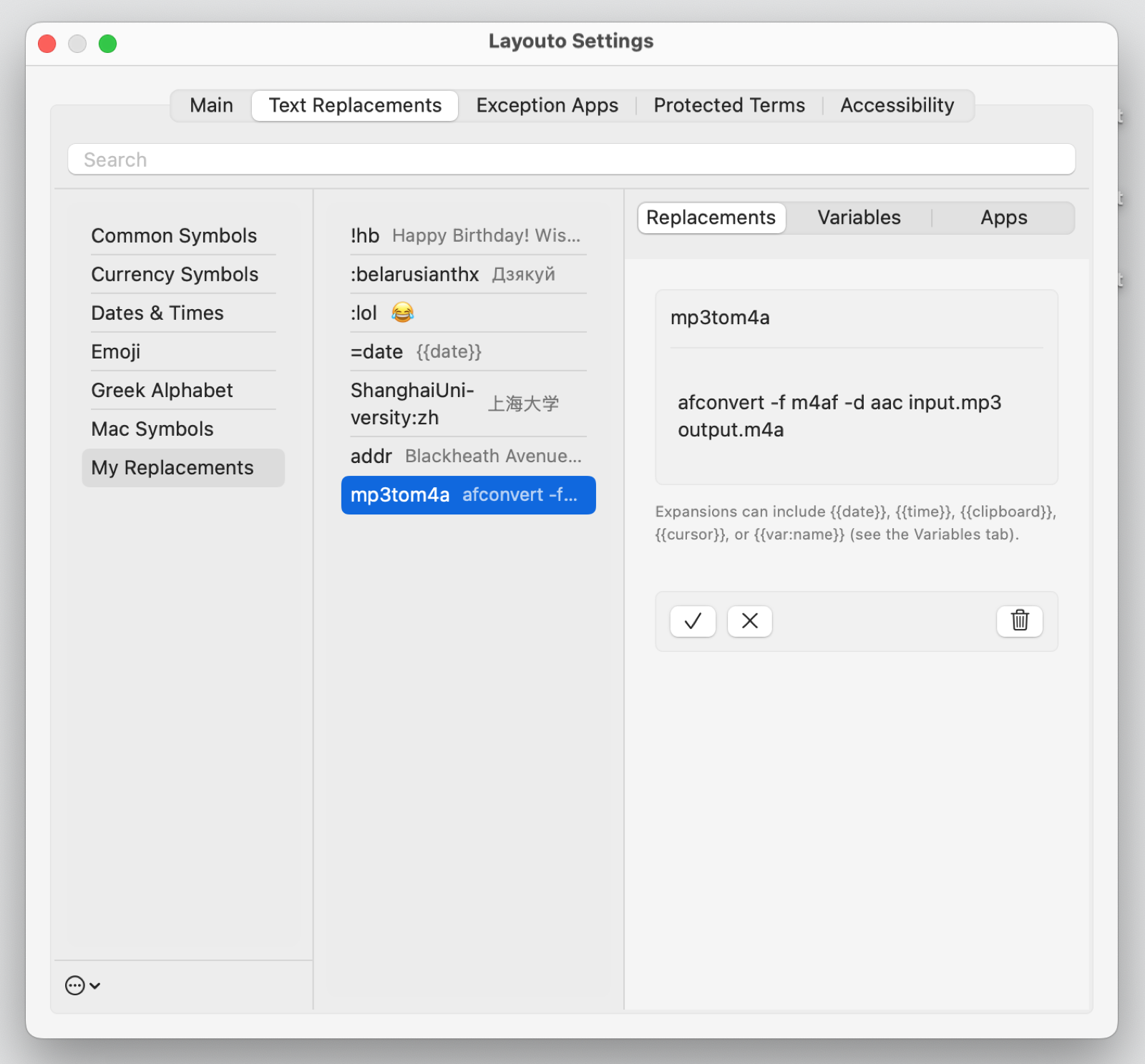
  1. Open Layouto → Settings → the “Text Expansion” tab.
  2. On the left are Sets: built-in ones (symbols, dates, emoji) and your own “My Replacements”. Pick a set, click +, and enter an abbreviation and the text it expands to.
  3. Type the abbreviation in any app and press Space, and it expands into the full text.
  4. The “Variables” tab supports {{date}}, {{time}}, {{clipboard}}, {{cursor}}, and your own {{var:name}} variables right inside a replacement.

Pricing

Buy the Full Version with everything in it, or only the part you need.

Full Version: everything Layouto does

Full Version, monthly

$2.99/month

Full access, billed monthly.

Or one part on its own

Keyboard Layout Switcher

$12.99/year

Fixes words typed in the wrong layout and corrects typos.

Text Expansion

$12.99/year

Your own text shortcuts, plus typo correction.

Download Layouto on the Mac App Store

Every feature is free for 7 days.
Cancel anytime in your App Store account settings.

Prices are shown in US dollars. Your local App Store may show a different amount in your currency.

How Layouto compares

A few other tools do part of this, but none of them does all three.

Layouto’s text-shortcut engine holds up against the established players, and none of them fixes a wrong keyboard layout at all.

FeatureTypinatorTextExpanderText BlazePhraseExpressLayouto
DistributionDirect (ergonis.com)Direct (textexpander.com)Direct download; also a Chrome extensionDirect (own store)Mac App Store
Price$49.99 one-time (Basic, macOS only) or $29.99/yr (Advanced, macOS+iOS)$60/yrFree, or $2.99/mo Pro€83.99 Standard / €126.01 Professional, one-time (plus VAT)$2.99/mo or $19.99/yr
SearchYesYesNoYesYes
Sets / foldersYesGroupsFoldersGroupsSets
Starter packsCommunity TSVPublic GroupsMarketplaceNo6 built-in
Import / exportplist / csvCSVCSVYesTSV / CSV / plist
Named variablesYesNoForm fieldsYesYes
Cursor positioningYesYesYesYesYes
Per-app scopingAppsYesNoYesPer set
Usage statisticsYesYesNoNoYes
Regex triggersYesNoNoMacro languageYes
Automatic layout fixNoNoNoNoYes

Comparison current as of September 2026. This is a snapshot, not a live feed: features and prices change, so check the source before relying on a claim here.

Layouto is the only app on the Mac App Store that does all three: it fixes the layout, catches the typo and expands the shortcut.

Frequently asked questions

Can’t find an answer, or something’s not working? Write to us at support@layouto.app

What is Layouto?

Layouto is a menu-bar app for macOS 13 and later that helps in every app where you type. It expands your text shortcuts into full phrases, corrects misspelled words with your Mac’s built-in spell checker, and converts a word typed in the wrong keyboard layout into the word you meant. It is available on the Mac App Store: free for 7 days, then a monthly or yearly subscription.

Does Layouto send anything I type anywhere?

No. Layout detection and correction happen entirely locally on your Mac, and nothing you type is logged or transmitted. One thing is kept, on your Mac only: when you undo an automatic correction with double Shift, Layouto notes that word, and after three undos it stops correcting it. The words it has stopped correcting are listed in Settings, where you can remove them.

Why does it need Accessibility permission?

Layouto uses Accessibility purely for input assistance: catching a mistake at the moment it happens, not for anything broader. It watches which key you press (a key code, not your screen content) so it can tell when your typed word only makes sense under a different keyboard layout, then enters the correction as an ordinary delete-and-retype.

That’s the entire scope: Layouto never reads another app’s text, interface, or screen. The AXUIElement APIs that would allow that are never called in the app, and the App Sandbox blocks that kind of cross-app access regardless. Keys are buffered locally for the current word only and discarded the moment the word is finished; nothing is logged or transmitted, and the only thing kept on your Mac is a note of the words whose automatic correction you undid, so that a word you keep undoing stops being corrected.

This is assistive technology in the literal sense of the term. Cognitive and memory conditions, including ADHD and executive function disorders, often make it hard to reliably track which layout is active right now; Layouto takes over that job instead of asking anyone to watch for it themselves. For people with a motor impairment, the benefit is fewer actions: no manual delete-and-retype cycle, less repetitive strain on the hands. VoiceOver users and others with a visual impairment cannot see the small layout indicator in the menu bar at all, so the correction has to happen without ever requiring a glance at it. Dyslexia and other language-processing conditions make fast layout switching especially error-prone, and older users working across several languages carry that same cognitive load. Accessibility is what lets Layouto catch the mistake on their behalf, automatically, before it needs fixing by hand.

Does it work offline?

Yes. All correction runs without an internet connection.

How do I undo a wrong correction?

Press Shift twice. That restores the original text, and pressing Shift twice again cycles through your enabled layouts.

How much does it cost?

You get 7 days of full access for free, followed by a subscription. You can manage or cancel anytime in your App Store settings.

Which languages are supported?

Layouto supports 43 languages in three tiers.

Tier 1
Arabic, Bulgarian, Danish, French, German, Greek, Italian, Norwegian, Polish, Portuguese, Russian, Spanish, Swedish, Turkish, Ukrainian, Vietnamese: convert automatically to and from every other Tier 1 or Tier 2 language. Belarusian, Croatian, Persian and Serbian convert automatically too, with dictionaries built into Layouto.
Tier 2
English, Dutch: convert automatically from any non-Latin script (Cyrillic, Greek, Hebrew, Arabic…); converting into them from another Latin layout takes the double-Shift keyboard shortcut.
Tier 3
Armenian, Bengali, Czech, Estonian, Finnish, Georgian, Gujarati, Hebrew, Hindi, Hungarian, Icelandic, Irish, Kazakh, Lithuanian, Punjabi, Romanian, Slovak, Slovenian, Telugu, Uzbek, Welsh: manual conversion on request (double Shift), or download a Hunspell dictionary for your language (a .dic + .aff pair, e.g. from the LibreOffice dictionaries collection), put both files into ~/Library/Spelling, then log out and back in (or restart your Mac). On the next launch Layouto detects the real dictionary and enables automatic conversion, so Hebrew, for example, moves to Tier 1.

If the files came from a browser, clear quarantine in Terminal: xattr -dr com.apple.quarantine ~/Library/Spelling

Can I add a language that isn’t auto-converted?

Yes. Layouto relies on macOS’s built-in spell checking. Download a Hunspell dictionary for your language (a .dic + .aff pair, e.g. from the LibreOffice dictionaries collection), put both files into ~/Library/Spelling (Finder → Go → Go to Folder…), then log out and back in (or restart your Mac). On the next launch Layouto detects the real dictionary and enables automatic conversion.

If the files came from a browser, clear quarantine in Terminal: xattr -dr com.apple.quarantine ~/Library/Spelling.

The dictionary has to genuinely validate words, meaning it rejects nonsense. Between different scripts (Hebrew ↔ English), conversion turns on right away, and between languages that share a script, it turns on only if the layout has letters distinctive of that language (ä, ş, ї…).

Ready to download

Layouto is live on the Mac App Store.
It’s free for 7 days, then continues with a monthly or yearly subscription.

Download Layouto on the Mac App Store

macOS 13 or later.